The last entry ended on a limit I believed was hard: no input goes through MCP, so the agent could check that state changed but not that the level plays. Two toolsets that ship with Unreal 5.8 and were never switched on in this project changed that. The agent now starts the game, presses a key, reads what the game did, and compares it with expectations written down before the run. The first thing it caught with nobody watching was a bug I already knew about, this time with numbers attached.
True, four times
SlateInspectorToolset exposes PressKey. The plan was simple: start play-in-editor, press space, watch the robot jump.
The first four attempts failed and reported success. PressKey returned true. Click returned true. Selecting the window returned "OK". The robot stood at z = 92.2 with JumpCurrentCount at 0 across every sample.
The editor wasn’t the active window. Chrome was. Slate routes a key press to whatever widget has focus, and an editor sitting in the background has no focused game viewport to deliver it to, so the key went nowhere and the call still succeeded. Windows won’t let a background process pull itself to the front either; getting the editor there took AttachThreadInput against the thread that owned the foreground. With the editor actually in front, the same call worked first try.
Then it failed again, in a recorded run that did everything the spike had done. Measured: foreground and no click on the viewport, the robot didn’t move, 0 of 2. Click the viewport first, it jumped, 2 of 2. The spike had worked because a click had happened earlier in the same session, and nobody had written that down.
So true from PressKey means the call was accepted. Whether the game heard it is a separate question, and the tool can’t answer it. That is the rule everything else in this entry is built on: a tool’s return value is never evidence. Evidence is something the game did.
It also means an agent verifying gameplay owns the screen while it does it. That can’t run in the background while I work in another window, and the system has to say so out loud instead of hiding it in a wrapper.
The game was readable all along
What counts as something the game did? Last time I found the capture tool renders the editor’s world, where the play session’s pawn doesn’t exist. I assumed the rest of the tools lived there too.
They don’t. During play-in-editor, find_actors returns the live game world — all 87 actors came back prefixed UEDPIE_0 — and the same transform and property tools I’d been using in the editor read and write it. Teleport the pawn 4 metres up and gravity brings it back. The world is ticking and it answers.
That gives three kinds of evidence that don’t depend on what the tool returned:
SpaceBar, grounded at z = 92.2
  z:                92.2 → 97.6 → 115.5 → 120.4 → 122.5 → 103.4 → 91.8 → 92.2
  JumpCurrentCount: 0 → 1 on the press, 0 on landing

LeftShift (dash)
  x:   0 → 325 cm, z constant
  log: CRATE SMASHED ×8, DATA CHIP, DASH GUARD
The counter is the strongest of the three. Only ACharacter::Jump() moves JumpCurrentCount, so it going to 1 means the key reached gameplay code. Physics can move a pawn. Only the jump moves that number.
Files, hooks and a Python script
One working spike is a demo. I wanted every session to leave evidence behind, and the obvious move was to build something that drives Claude Code: a loop, a daemon, a queue of missions.
I didn’t. Claude Code stays the agent. What got added is a run directory per session — the mission, the environment, a timeline of every tool call written by Claude Code’s own hooks, snapshots of the level before and after, captures, git state, and a result.md of what was observed. A small Python script opens and closes runs, takes captures and records states. No database, nothing running between sessions. If Unreal is down, or a capture fails, the run notes it and carries on; if the session dies halfway through a call, the next run closes the dangling call as incomplete.
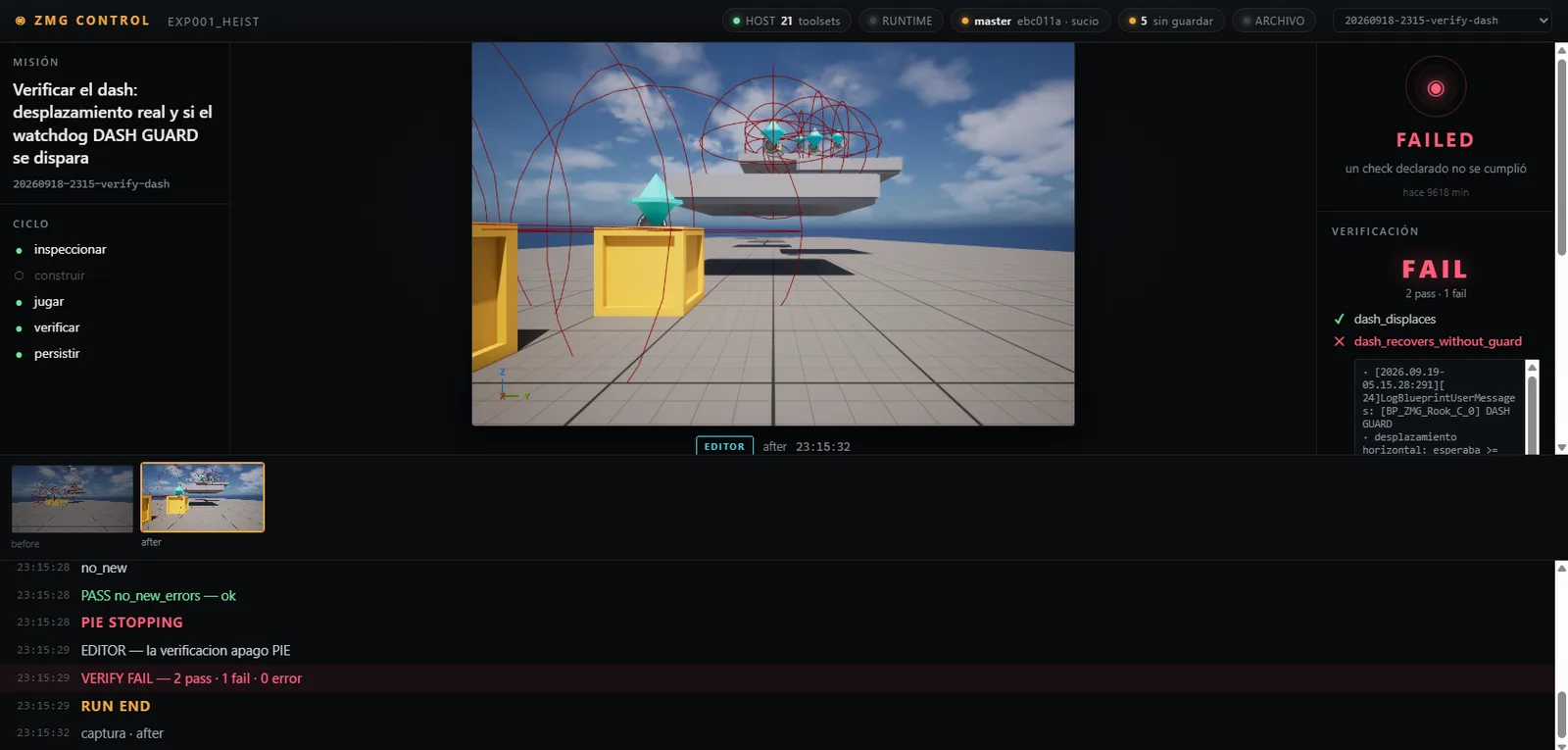
The reason is that every piece of it can be read with a text editor a month from now, and none of it can take the agent’s decisions away from it. The same hooks now also feed a live panel in Mithra, so I can watch the Unreal calls, the Blender calls and the subagents in separate lanes while it works. That’s the screenshot above: a board over the run directories, reading files.
Checks that can say no
A run records what happened. Verification says whether that’s what was supposed to happen, and it only has three kinds of check: a thing exists or has a value, a line appears in the log (or no new errors do), or press a key and observe the game. Each check is a name with parameters. There’s no expression language, on purpose — when a check fails I want to know which one and why without reading code.
The first verification run I trusted, I shouldn’t have. It confirmed a DASH GUARD line that was twenty minutes old. Logs don’t know which run they belong to, and comparing timestamps across the editor’s clock, UTC and my time zone was a bug waiting to happen. So each check now writes a unique marker into Unreal’s own log before it acts and only reads what comes after it. Position in the file, no clocks. If the marker has scrolled out of what it can read, the check comes out as an error. It can’t come out as a pass.
And one run exists just to fail: a jump expected to rise at least 5 metres. It rose 30.4 cm and the verifier said FAIL. A verifier I’ve never seen say no hasn’t told me anything yet.
The dash
The robot’s dash has a watchdog. The template ends the dash from an event inside the animation, and in this project that event sometimes gets lost and leaves the character frozen mid-dash, so a check in Tick forces the dash to end after 0.65 s and prints DASH GUARD when it has to. Last time I found it by playing. This time the agent ran it:
dash_displaces               PASS   expected ≥ 150 cm   observed 754.2 cm
dash_recovers_without_guard  FAIL   expected ≥ 150 cm and no DASH GUARD after the key
                                    observed 123.6 cm, 1 DASH GUARD line
Two presses, 13.5 seconds, no human. The first dash covered 754 cm. On the second, the guard fired inside the window that check owns, and the dash covered 123.6 cm, about a sixth of the distance. I knew the bug existed. I didn’t know what it cost in distance, and now there’s a run on disk that reproduces it and a check that will say when it’s gone.
Where it still ends
- No held keys.
PressKeyis key-down and key-up in the same frame. Five presses ofWmoved the robot 2.6 cm. Jump, dash and attack can be tested; walking, charging and blocking can’t. - It takes the screen. Foreground plus a click, every time.
- A failing check can be read but not seen. The board shows two captures per run, before and after. The next piece is a capture at the key press and another as each check closes, attached to the check’s result.
- Feel is still mine. The agent can now tell me the dash came up short. It can’t tell me the dash feels good.
What moved since last time: from “the agent verifies state and a person verifies that it plays” to “the agent verifies anything triggered by a single press, and says which expectation failed and by how much.” That’s a smaller gap than the one in the last post, and it closed because I stopped trusting the tool’s answer and started asking the game.
Ruiciro Rivera — Senior AI engineer, AI enthusiast, and builder of worlds. By day I build production LLM systems; by night I ship my own products with Claude — and, occasionally, a video game. Find me on LinkedIn and GitHub.
← back